Introduction and Setups
The Eureka Encryption FTP is designed to connect and pass files as an FTP client from
your local machine to the remote FTP server. The difference between our FTP application
and similiar applications is the ability to transfer and receive encrypted files. This
will allow the server to always have the files in an encrypted state.
The Main Menu screen:
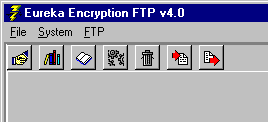
The buttons you see will allow you to do the following:
 Connect
This will take you to the main FTP screen where you
will connect to the server.
 Define FTP Sites
This will take you to the FTP Setup screen, which is described below.
The next five buttons are described in the System Control Files section:
 Code Book
 Create System
 Kill System
 Restore System
 Copy System
Defining the FTP Site
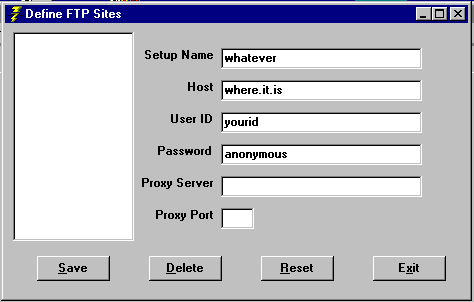
The left portion contains the list of FTP sites that have been defined. Simply
input the data into the text boxes and click save to add it to the list or
update an existing setup. You can delete a setup by clicking on it on the
left then clicking on the Delete button. The Reset button will clear out the
input fields. The Password field will default to annonymous. You might need
to enter in Proxy information, but it is not required.
You can then connect to the FTP server and perform the chief functions of this
program.
Return to Help Menu
Copyright © 1998-2002 Data Security Solutions, Inc. All rights reserved.
All registered marks and trademarks mentioned in this site
are the property of their owners.